Mastering Agentic AI For Elite Coaching
Beyond Conversation: Mastering the Agentic Era with Claude, Perplexity, and the Elite AI Toolbox
The shift from conversational AI to agentic AI is the defining professional trend of 2026. Most business owners are still stuck treating AI as a conversational "librarian"—you ask a question, and it finds the information, but you still have to do the actual work yourself. The landscape has evolved. AI is no longer a chat companion; it is a worker.
An AI Agent is an autonomous system that understands a goal, decomposes it into complex tasks, orchestrates the necessary models, interacts with your file systems and cloud apps, and delivers a finished artifact.
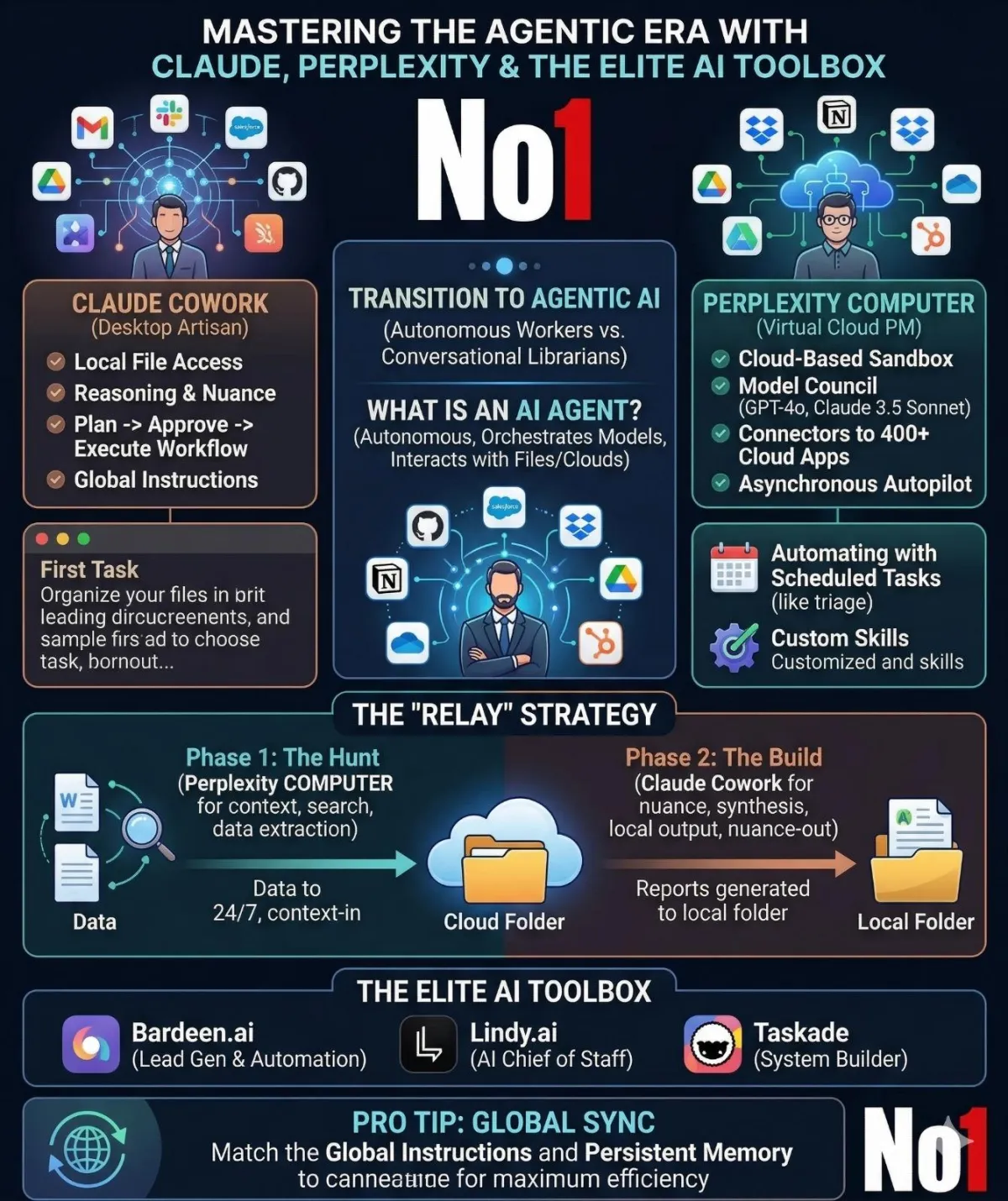
For coaches, consultants, and creators striving for peak performance, two agentic titans now lead this space: Claude Cowork and Perplexity COMPUTER. While they might appear similar, their underlying philosophies, environments, and optimal use cases are distinct. If you choose only one, you are missing half the opportunity. The elite strategy is not "either/or," but "and."
Here is your definitive guide to mastering agentic AI, turning search into a structural advantage, and maximizing efficiency by using the "Relay" strategy.
1. Introducing the Titans: Desktop Resident vs. Cloud Orchestrator
The fundamental difference between these two platforms lies in their operational environments.
Meet Claude Cowork: The Artisan on Your Desktop
Claude Cowork is designed to be a local extension of your own hands. It sits at your virtual desk, living within the Claude desktop application (available with full parity on macOS and Windows).
●Environmental Edge: Claude Cowork has direct, low-latency access to your physical, local file system. It does not require uploads; it reads from and writes to your actual hard drive.
●The Nuance Powerhouse: Built on the latest Claude models, its strength lies in reasoning and nuance. It excels at writing that sounds authentic and managing complex, multi-layered instructions without losing the thread of your communication style.
●The Synchronous Loop: It prioritizes precision and safety. Cowork operates on a strict "Plan → Approve → Execute" workflow. It will never move or delete a local file unless you explicitly review its tactical plan.
Meet Perplexity COMPUTER: The Virtual PM in the Cloud
If Claude is your artisan, Perplexity COMPUTER is your high-level Project Manager, running an entire department from a cloud-based sandbox. It doesn't use just one model; it uses a "Model Council." When you assign an outcome, Perplexity's "meta-router" determines which model is best for each sub-task—perhaps GPT-4 for logic, Claude 3.5 Sonnet for synthesis, and its own Deep Research agent for web gathering—all within a single workflow.
●The Orchestration Engine: Perplexity breaks outcomes down into sub-tasks (one agent searches, one writes code, one builds a PDF) and delivers the result as a dynamic "Artifact" (a spreadsheet, an interactive chart, or even a mini-app).
●Breadth over Depth: Perplexity's secret sauce is its integration layer, which uses Connectors to plug into 400+ cloud apps—bridging Gmail, Slack, Salesforce, GitHub, and Notion.
●Asynchronous Autopilot: Since Perplexity COMPUTER runs entirely in the cloud, it acts as a digital employee that works 24/7, completely independent of your computer being awake.
2. Setting Up Your Digital Agency: Step-by-Step Guides
Both tools require a shift in how you initialize work.
Mastering Claude Cowork (Setup & The First Task)
Getting started with Cowork takes about two minutes. Cowork requires a paid Claude plan (Pro or Max) because multi-step agentic tasks are significantly more compute-intensive than regular chat.
Step 1: Download & Log In
Download the Claude desktop app from claude.ai/download. Look for the mode selector at the top and click Cowork. You are now "in the loop."
Step 2: Strategic Setup via Global Instructions (The "No. 1" Strategic Context)
Your first configuration step—and one you should never skip—is defining your Global Instructions in Settings > Cowork. This is your foundational context. It automatically applies to every session, ensuring Claude already understands your brand and goals.
EXAMPLE: Global Instructions for an Elite Coach
"I run an elite executive coaching business focusing on high-ticket sales leadership. Reports should prioritize ROI, revenue operations, and action items. Communication tone is direct, non-jargon, and authoritative. Final outputs should default to Word format for synthesis and landscape view for presentations. My main products are high-level sales scripts, training manuals, and LinkedIn strategy documents."
Your First Cowork Task: Organizing the Mess
The easiest high-value task is automating file hygiene. Notice the critical inclusion of the approval clause.
Prompt: "Help me organize my Downloads folder. Scan the contents, propose a folder structure, and suggest naming conventions based on context. Show me the plan before making any changes. Only proceed after I approve."
Mastering Perplexity COMPUTER (Scheduling & Custom Skills)
Perplexity is accessed through the "Computer" icon in your sidebar. Unlike the standard search bar, the Computer field is designed for outcomes, not questions.
Automating with "Scheduled Tasks"
The most powerful feature of Perplexity COMPUTER is the ability to put work on autopilot via the /schedule command. You set a goal and a schedule, and it runs asynchronously.
SCHEDULED TASK (Daily Urgent Triage): "Daily at 12 PM. Check my Gmail for any urgent messages from key clients. Draft suggested responses focusing on immediate ROI and solution orientation. Save as a .md file into my 'Urgent Triage' Dropbox folder."
Custom "Skills": Your Secret Reusable Playbook
You can create reusable Skills—stored as Markdown (.md) files—that define exact, repeatable playbooks.
●Create competitor-research-skill.md.
●Define the 10 specific steps you must take every time you request analysis.
●Now, when you use the command /research, Perplexity always follows your exact methodology.
3. The Tandem Powerhouse: The "Relay Strategy."
Sophisticated users don't choose one agent; they use a Relay Strategy to maximize efficiency. This workflow uses Perplexity COMPUTER as the "Inbound/Hunt" engine and Claude Cowork as the "Outbound/Build" producer.
The workflow operates on a strict principle: Perplexity builds the context (Context-In); Claude builds the output (Nuance-Out).
Phase 1: The Hunt (Using Perplexity COMPUTER)
Use Perplexity for "wide-net" tasks where integration and speed matter.
Orchestrated Research: Have Perplexity scan the web for the latest market trends, competitor intelligence, and social media sentiment.
Data Extraction: Instruct it to pull the last 50 emails from a crucial Slack support channel and summarize the recurring "pain points."
The Hand-off: Save these summaries as a structured JSON or Markdown file directly into your syncedCloud Folder (Dropbox, Google Drive, or OneDrive).
Phase 2: The Build (Using Claude Cowork)
Now, bring that data "home" to your local workspace, using Global Instructions to ensure tone consistency.
Contextual Synthesis: Point Claude Cowork to that synced cloud folder.
High-Level Output: Use Claude's superior reasoning to turn that synthesized research (the "pain points") into a high-ticket sales script, a 30-page training manual, or a sequence of long-form LinkedIn articles.
Local Execution: Have Claude format those outputs into branded Word documents and automatically organize them into your physical "Ready to Publish" folder.
4. Expanding Your Agentic Toolbox: Elite Ecosystem Resources
To truly build a structural advantage, your agentic strategy should include specialized tools that complement Claude and Perplexity. Here are essential resources for an elite coaching workflow.
Find & Automate Leads: Bardeen.ai
While Perplexity scans the general web, Bardeen. AI is an agentic powerhouse for hyper-targeted, structured lead generation and workflow automation. Bardeen uses AI to build "playbooks" that can, for instance, automatically build a list of attendees from a LinkedIn event, enrich their profiles, and drop them into your HubSpot CRM while you sleep. Use Bardeen to execute Phase 1 (The Hunt) for specific, structured data sources that require browser-based automation rather than generalized search.
The AI Chief of Staff: Lindy.ai
If you need an agent purely dedicated to administrative operations, Lindy. AI is a specialized "AI Assistant for Work." While Claude focuses on nuance and Perplexity focuses on orchestration, Lindy excels at high-value administrative tasks, including autonomously handling complex meeting scheduling (across different organizations), triaging complex email threads with persistent memory, and serving as an autonomous Chief of Staff to manage your internal operations.
Complete Systems from One Prompt: Taskade AI System Builder
Once Claude has synthesized your high-level context (Phase 2), Taskade's AI System Builder lets you structure that data into complete operational systems. With a single prompt, you can turn a synthesized training strategy into dynamic task lists, mind maps, functional structured databases, and repeatable workflows. Taskade excels at turning Claude's nuance into actionable, team-wide execution structures.
Pro Tip for Final Integration: The "Global Sync"
For maximum efficiency, ensure your Global Instructions in Claude and your Persistent Memory in Perplexity are identical. Define your role, tone, and standard for "done" once, and replicate it exactly on both platforms. This ensures the research Perplexity gathers is perfectly pre-formatted for the synthesis Claude is about to perform.
By using these tools in tandem and deploying specialized agents from the elite ecosystem, you don't just optimize your workflow; you replace yourself as the primary information organizer, freeing your bandwidth to focus on what only you can do: coaching your elite leads.
