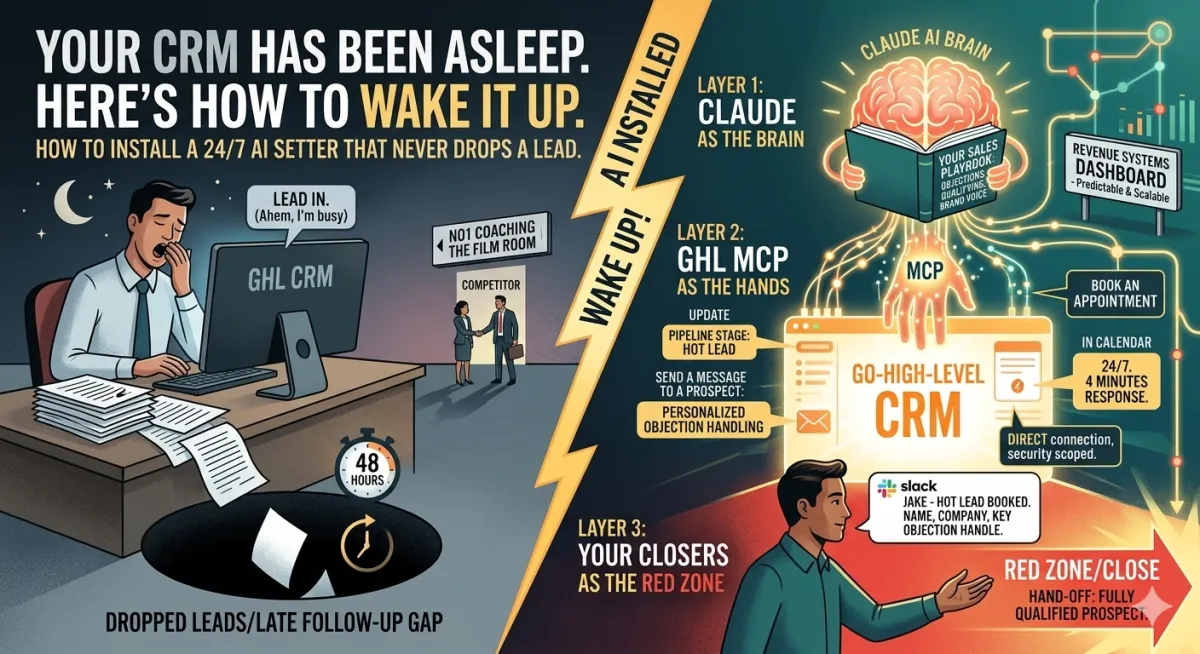
Your CRM Has Been Asleep. Here's How to Wake It Up.
How to Wire Claude AI Directly Into GoHighLevel and Install a 24/7 AI Setter That Never Drops a Lead
The Tactical Brief | No1 Coaching
Every high-ticket sales operation has the same invisible hemorrhage.
Leads come in. Your team is busy. The follow-up is late, generic, or doesn't happen at all. A prospect who was genuinely interested 48 hours ago has since taken a call from your competitor, who got back to them in 4 minutes with a personalized response that addressed an objection they hadn't even voiced yet.
You didn't lose that deal in the close. You lost it in the follow-up gap — the window between "interested" and "booked" where human capital runs out, and automated sequences feel like exactly what they are.
The solution is not more salespeople. The solution is not better drip sequences. The solution is installing an AI that actually reads the room, references your playbook, handles the objection, and either books the call or flags the prospect for your closer — while you're doing something else entirely.
Here's exactly how to build it.
What Changed: Why Now Is Different
For years, "AI in your CRM" meant rigid chatbots — decision trees dressed up in friendly language. If a prospect went off-script, the bot broke. If the question was nuanced, the response was useless. The technology created more frustration than it solved.
That era is over.
Claude AI's reasoning capability — its ability to understand context, hold a conversation naturally, reference a knowledge base, and make judgment calls — combined with GoHighLevel's new native MCP (Model Context Protocol) server, creates something genuinely different: an AI that has direct, live access to your CRM data and can take real action inside it.
Not a webhook workaround. Not a Zapier bridge. Not a third-party integration layer you have to maintain separately.
GoHighLevel now has a native MCP server that lets Claude read your contacts, search conversations, send messages, update opportunities, move pipeline stages, pull calendar data, and create tasks — all through a secure, direct connection. Your AI setter isn't just answering questions anymore. It's working your CRM.
The Architecture: How It Actually Works
Before building anything, understand the three-layer system you're constructing.
Layer 1: Claude as the Brain. Claude holds your entire sales playbook — your objection-handling frameworks, your value propositions, your qualifying criteria, your brand voice, your pricing parameters. This lives in a carefully constructed system prompt. Claude reads every incoming message against this playbook and decides what to say next.
Layer 2: GHL MCP as the Hands. The GoHighLevel MCP server gives Claude direct access to your CRM. It can pull a prospect's full contact history before responding, update their pipeline stage after a qualifying exchange, send messages directly into the conversation thread, tag contacts based on intent, and book appointments into your calendar. No copy-pasting. No human in the middle. Real CRM actions taken automatically.
Layer 3: Your Closers as the Red Zone Human closers are removed entirely from the early-stage exchange. They only receive a hand-off notification when a prospect is fully qualified, the pipeline stage is updated, and an appointment is booked. They step onto the field when it's time to close — not when it's time to answer "what does this cost?"
This is the offensive line model. Claude blocks everything until the right moment. Your closers' score.
Setting It Up: Step by Step
Step 1: Connect GoHighLevel to Claude via MCP
This is the foundation. GoHighLevel's native MCP server connects directly to Claude, eliminating the need for a third-party automation platform.
In GoHighLevel:
Go to Settings → Private Integrations
Click Create New Integration
Select the required scopes — at minimum: View/Edit Contacts, View/Edit Conversations, View/Edit Conversation Messages, View/Edit Opportunities, View Calendars & Calendar Events
Copy your Private Integration Token (PIT) and store it securely — treat this like a password
Your MCP configuration (add this to your Claude agent setup):
json
{"mcpServers":{"gohighlevel":{"url":"https://services.leadconnectorhq.com/mcp/","headers":{"Authorization":"Bearer YOUR_PIT_TOKEN","locationId":"YOUR_SUBLOCATION_ID"}}}}Once connected, Claude has access to 36 live GHL tools, including contact management, conversation search and messaging, opportunity pipeline updates, calendar events, and payment data. The roadmap expands this to 250+ tools.
Security note: Your Private Integration Token controls exactly what Claude can and cannot touch. Scope it to only what the agent actually needs. A follow-up agent doesn't need access to payment data. Least privilege is your friend.
Step 2: Codify Your Sales Playbook Before Building Anything
This is the step that determines whether your AI setter sounds like you or sounds like a bot.
Before writing a single automation, document your expertise:
What are the five most common objections you hear, and what's your exact response to each?
What qualifying questions do you ask in the first exchange?
What makes a prospect "hot" versus "not yet"?
What's your brand voice — direct, warm, authoritative, conversational?
What are your pricing guardrails — what can you share, what do you hold back?
What does a fully qualified prospect look like before they book a call?
Write all of this down as if you're briefing your best new hire on their first day. This document becomes Claude's system prompt, the playbook it references every time it responds to a lead.
The AI cannot replace your judgment. Once your judgment is clearly written down, the AI executes it flawlessly at scale. That sequence — document first, automate second — is non-negotiable.
Step 3: The AI Appointment Setter
This is your first and highest-leverage automation.
What it does: When a lead responds to any outreach — an ad, a DM, an email campaign — Claude picks up the conversation. It pulls the prospect's full interaction history from GHL, references your playbook, and engages naturally. It handles objections, answers qualifying questions, and drives toward a booked appointment. When the prospect books, Claude updates their pipeline stage and adds appropriate tags. When they go cold, Claude flags them for reactivation.
Your system prompt structure:
You are [Name], an elite sales assistant for [Your Company].
YOUR ROLE:
You handle initial conversations with prospects who have expressed interest in [your offer]. Your job is to qualify them, handle their questions and objections, and book a strategy call with our team.
YOUR PLAYBOOK:
[Paste your objection handling frameworks here]
[Paste your qualifying criteria here]
[Paste your value propositions here]
YOUR VOICE:
[Describe your communication style — direct, warm, no jargon, etc.]
PRICING GUARDRAILS:
[What you can discuss, what requires a human conversation]
BOOKING GOAL:
Your primary objective is to get a qualified prospect on a 30-minute strategy call. The calendar link is: [your link]
QUALIFICATION CRITERIA:
Only push toward booking if the prospect meets: [your criteria]
WHEN TO FLAG FOR HUMAN:
Escalate immediately if: [your escalation triggers]
The difference between this and a legacy chatbot is how it handles unexpected responses from a prospect. A legacy bot breaks. Claude reads the context, references the playbook, and responds appropriately — because it's reasoning, not pattern-matching.
Step 4: Dynamic Pipeline Routing — The Intent Engine
This is where your CRM stops being a database and becomes an active routing system.
The mechanism: Instruct Claude to append a hidden intent classification to every API response — a structured tag that GHL workflows can detect and act on.
Intent classifications to build:
TagMeaningGHL Action[INTENT: HOT]Strong buying signals, ready to book. Move to Hot Lead stage, notify closer via SMS/Slack[INTENT: BOOKED]Appointment confirmed. Move to the Booked stage, send confirmation sequence[INTENT: NURTURE]Interested but not ready. Move to Nurture stage, enroll in follow-up sequence[INTENT: UNQUALIFIED]Doesn't meet criteria. Move to Disqualified, remove from active pipeline[INTENT: ESCALATE]Needs a human immediately. Trigger an urgent alert to the sales lead
Inside GoHighLevel: Build a workflow that listens for each of these text strings in the conversation or a custom field. When detected, it triggers the corresponding pipeline movement, tag update, and notification.
Your closers now receive a Slack notification that says: "Jake — hot lead just booked. Name, company, key objection already handled, qualification confirmed. Call is Tuesday at 2pm." They walk into that call with full context and zero administrative work behind them.
Step 5: Database Reactivation on Autopilot
If you've been in business more than two years, you have a goldmine sitting dormant in your CRM. Leads who expressed interest went cold and were never properly followed up on. Most sales teams ignore them because the manual effort isn't worth the return.
With Claude connected to GHL, this becomes a scheduled task that runs while you sleep.
The setup:
In GHL, create a Smart List: all contacts who are older than 90 days, have never booked a call, and have had their last stage set to "Lead" or "Interested."
Build a workflow that sends a simple, human-sounding reactivation message — no more than 9 words. No pitch. No pressure. Just a genuine check-in. "Hey [First Name], still looking to scale your revenue this quarter?"
The moment they reply — even with a single word — the workflow hands the conversation to Claude
Claude picks up with full context: who they are, when they first came in, what they expressed interest in, and the reactivation hook that just worked
Claude re-qualifies them, handles whatever has changed in their situation, and drives toward a booking
Intent classification routes them into the appropriate pipeline stage automatically
The math: If you have 2,000 dormant leads and 3% re-engage, that's 60 conversations Claude is handling simultaneously, qualifying in real time, and routing to your closers. All while you're running sessions with your current clients.
That's found money. It was always in your database. You just didn't have the infrastructure to mine it.
Step 6: The Social Media Closer Loop (Bonus)
The GHL MCP server now includes direct social media posting tools — create posts, pull analytics, and schedule content across platforms. Combined with Claude's content generation, this closes a loop most operators leave open.
The workflow:
Claude monitors your industry for trending topics via web search
Generates on-brand content in your voice
Posts directly to your connected social accounts via GHL MCP
Tracks engagement analytics
When a post generates inbound DMs, the appointment setter picks up the conversation
Your content and lead pipelines become a single, connected system. Content creates interest. The AI setter converts interest into appointments. Your closers close.
What Your Closers' Day Looks Like After This Is Built
7:00 AM — Claude has already handled six inbound responses from last night's ad campaign. Three are booked. Two are in the nurture sequence. One was disqualified.
9:00 AM — The overnight reactivation campaign re-engaged four dormant leads. Two booked calls for next week. Claude handled the entire exchange.
10:00 AM — Your closer gets a Slack notification: "Four new bookings overnight. Full context in GHL. All qualified."
Your closer opens GHL. Every contact has a full conversation history, intent classification, key objections already handled, and qualification status confirmed. They spend zero time on administrative catch-up. They spend their entire day on what they're elite at: closing.
That's the system. That's the operating model.
The Security Checklist Before You Deploy
Running an AI with live CRM access requires treating security like an SOP — not an afterthought.
Scope your token tightly. Your Private Integration Token should only include the permissions your agent actually needs. A follow-up bot doesn't need access to blog posts or payment data. Review and restrict scopes before connecting.
Never let Claude confirm financial transactions. The AI can discuss pricing ranges, address investment objections, and direct prospects to a conversation with a human. It should never have the authority to quote exact custom pricing, confirm agreements, or initiate any financial action.
Build an escalation trigger. If a prospect says anything legally sensitive, expresses serious distress, or asks a question outside the agent's scope of authority, Claude should immediately route it to a human. Document these escalation criteria explicitly in your system prompt.
Audit conversations weekly. Review a sample of Claude's exchanges regularly, especially in the first 30 days. You're looking for tone drift, off-playbook responses, or edge cases your system prompt didn't anticipate. Fix them as you find them.
Test before you go live. Run 20 simulated conversations with a test contact before connecting to real leads. Include your five hardest objections, an angry prospect, a confused prospect, and someone who tries to get Claude to go off-script.
The Strategic Reality
Here's what this system means at scale.
Your cost of acquisition drops because you're not paying a human setter's salary and benefits to handle conversations that AI can manage at a fraction of the cost — and with zero variance in quality or effort level.
Your lead response time drops to seconds regardless of time zone, day of the week, or volume. A Facebook ad runs at 11 pm on a Saturday and generates 40 responses. Claude handles all 40 simultaneously, qualifies them, and books the ones worth booking. Your team wakes up on Monday to a calendar.
Your closers' close rate goes up because they only see qualified, contextualized, warmed-up prospects. They stop burning energy on the 70% who aren't ready. They focus entirely on the 30% who are.
Your database becomes an active asset instead of a static archive. Every dormant lead is a potential reactivation conversation Claude can handle at zero marginal cost.
This is not a productivity tool. This is an infrastructure upgrade. The businesses that install it now will have a structural advantage over those that still manually follow up in 18 months. The gap is already opening.
Your Implementation Sequence
Week 1 — Foundation
Document your sales playbook: objections, qualifying criteria, brand voice, pricing guardrails
Set up your GHL Private Integration Token with appropriate scopes
Configure the MCP connection in your Claude agent setup
Write and test your system prompt with 20 simulated conversations
Week 2 — Appointment Setter
Deploy the AI setter on one lead source (one ad campaign or one inbound channel)
Build the intent classification workflow in GHL
Configure closer notifications via SMS or Slack
Monitor and refine for 5 business days before expanding
Week 3 — Reactivation
Build your Smart List of dormant leads
Create the 9-word reactivation message and workflow
Connect the reactivation handoff to Claude
Run your first reactivation campaign
Week 4 — Optimization
Review conversation logs and identify gaps in the system prompt
Expand to additional lead sources
Add the social content loop if applicable
Measure: lead response time, qualification rate, booking rate, close rate
The system is built. The integration is live. The playbook is yours to install.
The only question is whether you're going to build this infrastructure now — while your competitors are still manually following up — or six months from now, when they already have it running.
Elite operators don't wait to see where the game is going. They build for it before it arrives.
Jake Shannon is Grant Cardone's multi-time 10X Performance Coach of the Year and a Certified Chief Data & AI Officer (CCDAO). He is also founder of No1Coaching.com and the SportifyOS. He helps serious entrepreneurs engineer predictable revenue using financial engineering, elite performance systems, and advanced AI strategy.
Technical Resources:
Make.com GHL + Claude Integration (alternative approach if MCP native isn't available on your GHL plan)
